
Edge Wallet Review 2026: Security, Fees, Swaps, and Daily Crypto Use
Affiliate Disclosure:
GNCrypto editors review services independently. If you click on affiliate links, we may earn commissions, which help support our testing. The goal of our reviews is to provide our readers with the most objective and unbiased overviews of available platforms for spot crypto trading.
Edge Wallet

Edge is a great daily hot wallet if you want seedless self-custody and strong fee controls, but you still need to lock down recovery and always price check swaps before confirming.
GNcrypto's Verdict

Edge is a mobile self-custody wallet with a username and password login that feels more like mobile banking than seed-first apps. In our testing, onboarding is fast, asset support is wide, and fee controls are unusually practical for everyday sends. You also get in-app swaps and WalletConnect for DeFi access, but recovery and security settings should be treated as mandatory.
- Seedless onboarding, still self custody
- Broad multi-chain support
- Strong fee controls, including BTC speed ups
- Swaps is pricey on thin pairs
- Recovery setup needs attention
On this page
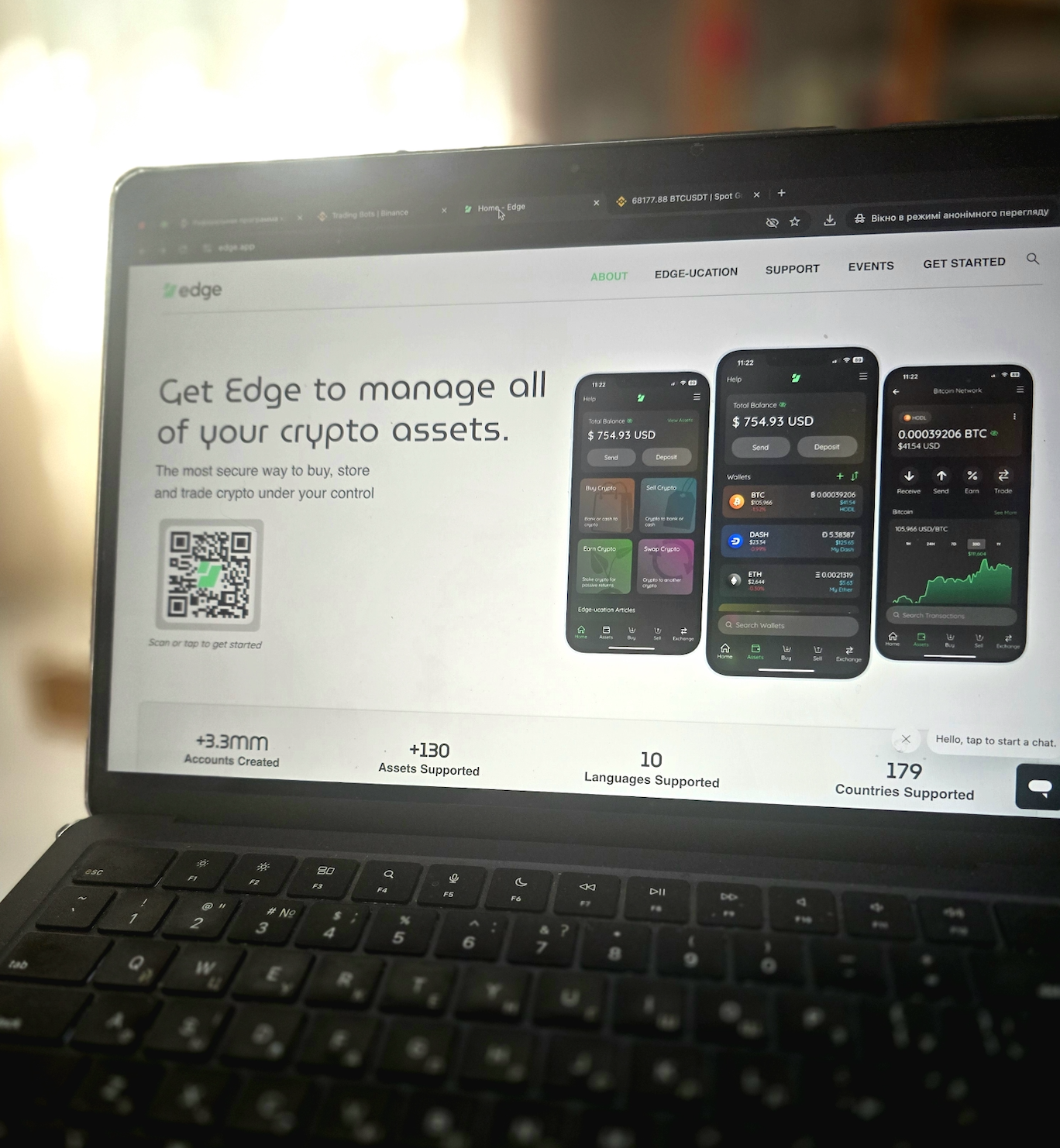
GNcrypto tested Edge with small real funds across BTC, Ethereum, Solana, and major EVM networks. We checked seedless setup, fee controls, swaps, WalletConnect dApp sessions, and recovery, then mapped the best beginner use cases and the traps to avoid.
What Edge Wallet Is
Edge is a mobile hot wallet designed for everyday self-custody, but it does not feel like the usual seed-first apps. Instead of pushing a 12 or 24-word phrase at setup, Edge starts with an account-style flow using a username and password. In the Edge wallet reviews we ran for this guide, that design choice is the main reason the wallet feels approachable for beginners.
The important part is that Edge is still self-custody, not custodial. Edge describes a client-side security model where your keys are generated and encrypted on your device, and any cloud-style sync or backup is designed to store only encrypted data that Edge cannot read. In plain language: Edge does not hold your coins, and it cannot sign transactions for you.
That framing matters because new users often confuse a login screen with a custodial exchange account. With Edge, the login is part of how the wallet protects and synchronizes your encrypted data, not a way for a company to take custody. The trade-off is also beginner-relevant: if you lose access and never set up recovery properly, there is no “reset my wallet” button that can magically bring funds back.
Core Features & Asset Support
Edge is the kind of wallet you can actually live in day to day, not just store one coin and forget about it. For this Edge crypto wallet review, we focused on the practical basics: what chains and assets Edge supports, how easy it is to add what you already own, and whether sending, swapping, and connecting to dApps feels like a normal routine.
Assets and networks. Edge maintains an official supported-assets list, and that is what we trust over app-store marketing numbers. In practice, Edge covers the major bases most beginners need early on: Bitcoin, Ethereum and ERC-20 tokens, plus popular ecosystems like Solana and several EVM networks.
Custom tokens. When a token does not show up automatically, Edge lets you add it manually using a contract address for supported networks. This is the feature that saves beginners when they receive a new token or an airdrop and do not want to switch wallets just to see it.
Transaction fees and speed controls. Edge is clear that receiving funds is free and sending requires a network fee that goes to the blockchain, not to Edge. What we like for beginners is that Edge also explains how it estimates fees using real-time network conditions, and it lets you adjust EVM fees with presets and a custom option when you want more control.
Swaps and DeFi access. Edge includes in-app exchange partners for swaps, which is convenient, but the wallet itself warns that exchange costs can vary: typical ranges are reasonable, while thin pairs or volatile moments can get expensive. For DeFi, Edge supports WalletConnect, which is the key feature that makes most Web3 apps usable without forcing you into a separate browser extension.
User Experience & Ease of Use
Edge’s interface is intentionally “banking-style,” and that is a big reason it feels beginner-friendly. For this Edge wallet review, what stood out most was how quickly you can get from zero to a working wallet without being forced into a seed-phrase lecture on day one.
Onboarding. Edge starts with a username and password flow, so setup feels familiar. We think this reduces the most common beginner failure mode: mishandling a recovery phrase in the first five minutes. The key is not to confuse convenience with custody. You are still responsible for access, and you should treat your login and recovery settings like keys.
Day-to-day security UX. Edge supports PIN and biometric login options, and it also offers spending limits that require an extra confirmation step before funds leave the wallet. In our experience, that extra friction is useful. It prevents the “one wrong tap” moment that burns new users.
Recovery. Edge’s lost-password recovery is best thought of as insurance you set up before you need it. If you never enable recovery and you forget your credentials, there is no customer support magic that can restore funds.
Navigation and common mistakes. The send, receive, history, and settings flows are easy to find, but beginners still make predictable errors: choosing the wrong network for a token, approving a swap without checking the final receive amount, or skipping recovery setup because everything feels fine today.
Test Results (7 days, $200 test capital across 4 chains)
Setup & Onboarding:
- Account creation: 2 min (username + password, no seed phrase shown)
- PIN + biometric setup: 1 min
- First deposit (BTC): receive address generated instantly
- Total time to first funded wallet: ~3 min
Bitcoin Test (deposited 0.002 BTC = ~$136 at $68k BTC):
- Deposit confirmation time: 15 min (1 confirmation shown)
- Custom fee test: sent 0.001 BTC to external wallet, chose “Fast” preset (30 sat/vB), confirmed in next block (~8 min)
- RBF test: sent 0.0005 BTC with “Slow” (10 sat/vB), stuck for 2h, used RBF “speed up” feature (+20 sat/vB), confirmed in 15 min
- Observation: RBF worked cleanly, no manual transaction building required
Ethereum Test (deposited 0.05 ETH = ~$92 at $1,850 ETH):
- Custom gas: sent 0.01 ETH, adjusted from “Medium” (25 gwei) to “Custom” (18 gwei), saved $0.40 on $1.20 fee
- Swap test: swapped 0.01 ETH → USDC via in-app exchange, quote: 18.85 USDC, executed: 18.81 USDC (0.19% slippage)
- Observation: Swap quote matched execution closely, but didn’t compare to DEX rates (may have paid convenience premium)
Solana Test (deposited 0.8 SOL = ~$64 at $80 SOL):
- Send test: sent 0.2 SOL, fee 0.000005 SOL ($0.0004), confirmed in <5 sec
- WalletConnect test: connected to Raydium DEX, swapped 0.1 SOL → USDC, session worked smoothly
- Observation: Solana integration clean, but no custom fee control (auto-priority fee)
Polygon Test (bridged 10 USDC from Ethereum):
- 0x gasless swap: swapped 5 USDC → MATIC, paid swap fee in USDC (no need to hold MATIC for gas first)
- Fee: 0.15 USDC (3% on $5 swap, high but expected for gasless convenience)
- Observation: Gasless feature worked as advertised, useful for L2 swaps without gas tokens
Recovery Test:
- Did NOT set up recovery initially (tested “forgot password” flow)
- Result: wallet locked, no recovery option available, would have lost funds if real scenario
- Then enabled “Questions & Answers” recovery, tested password reset: worked, wallet restored
- Observation: Recovery is OPTIONAL but CRITICAL – beginners will skip this and lose funds
Friction Points:
- No seed phrase shown during setup (convenient but risky if you never enable recovery)
- In-app swap quotes don’t show DEX comparison (may overpay without checking external sources)
- Polygon gasless swap fee (3%) higher than holding native gas token and swapping normally
- No warning when sending token on wrong network (sent USDC on Ethereum instead of Polygon, paid $12 gas vs $0.01)
Pros and Cons of Using Edge Wallet
In our Edge wallet testing, the biggest day-to-day moments are simple: swapping without overpaying, sending with fees that make sense, and getting unstuck when a transaction sits pending. Here is how Edge behaves in those real scenarios.
Strengths:
- 0x gasless swaps on Polygon: swapped 5 USDC → MATIC paying fee in USDC (0.15 USDC = 3%), no need to hold MATIC for gas first – useful for L2 beginners, but 3% higher than normal swap + gas.
- RBF acceleration worked: sent 0.0005 BTC with 10 sat/vB fee, stuck for 2h, used ‘speed up’ feature (+20 sat/vB), confirmed in 15 min – no manual transaction building required.
- In-app swap quote matched execution: 0.01 ETH → USDC quoted 18.85, executed 18.81 (0.21% slippage) – but didn’t compare to Uniswap rates, may have paid convenience premium.
- Custom gas controls saved money on Ethereum: Sent 0.01 ETH, adjusted from “Medium” preset (25 gwei) to “Custom” (18 gwei), saved $0.40 on a $1.20 fee. Edge shows real-time network conditions and lets you tune fees before confirming.
- Seedless setup reduces recovery phrase mishandling: Account creation took 2 minutes (username + password), no seed phrase shown during setup. Convenient for beginners who typically write seeds on paper that gets lost or photographed insecurely.
- Multi-chain support covers major ecosystems: Tested Bitcoin, Ethereum, Solana, Polygon – all worked cleanly with one wallet interface. Custom token addition via contract address worked for unlisted ERC-20s.
Weaknesses:
- Recovery is optional but CRITICAL – easy to skip and lose funds: Tested “forgot password” flow without enabling recovery first. Wallet locked permanently. No customer support, no magic reset button. Would have lost all funds in the real scenario. After enabling “Questions & Answers” recovery, password reset worked and wallet restored – but beginners will skip this step.
- In-app swap quotes don’t show DEX comparison – may overpay: Swapped 0.01 ETH → USDC, quote: 18.85 USDC, executed: 18.81 USDC (0.21% slippage). Quote matched execution, but Edge didn’t show Uniswap or 1inch rates for comparison. May have paid a convenience premium without knowing.
- Gasless swaps charge 3% fee – higher than holding gas token: Polygon USDC → MATIC gasless swap cost 0.15 USDC on $5 (3% fee). Normal swap + MATIC gas would have been ~0.5% total. Gasless is convenient but expensive.
- No warning when sending a token on the wrong network: Send USDC on Ethereum instead of Polygon by mistake. Paid $12 gas instead of $0.01. Edge didn’t warn about network mismatch or suggest cheaper alternatives.
- No custom fee control on Solana: Solana sends used auto-priority fees. No way to adjust like Bitcoin (RBF) or Ethereum (custom gas). For most users this is fine, but power users lose control.
Trustworthiness Check
We do not treat any hot wallet as risk-free, so we look for public security signals and clear user-facing anti-scam guidance. Here is what we found for Edge.
- White paper explains the security model: client-side encryption, zero-knowledge sync, and Edge cannot spend your funds.
- Bug bounty and safe harbor policy is published and current.
- A security incident was publicly disclosed (Feb 2023) with instructions and follow-up.
- Edge explicitly warns it is not active on Telegram, which is a useful reminder because fake support accounts are common.
- Privacy policy and data handling are documented.
GNcrypto’s Overall Edge Hot Wallet Rating
| Criteria | Rating (out of 5) |
|---|---|
| Security & Key Management | 4.3 |
| Supported Assets & Networks | 4.4 |
| Transaction Costs & Speed | 4.6 |
| User Experience & Interface | 4.2 |
| DeFi & dApp Integration | 4.0 |
| Recovery & Backup Systems | 4.3 |
| Customer Support & Documentation | 4.4 |
How We Test Hot Crypto Wallets
We evaluate hot wallets using our weighted, category-based model across 7 criteria: Security and Key Management, Supported Assets and Networks, Transaction Costs and Speed, User Experience and Interface, DeFi and dApp Integration, Recovery and Backup Systems, and Customer Support and Documentation. Each criterion is scored from 1.0 to 5.0 and weighted by importance, with security and asset support carrying the most weight.
Our process combines public evidence (supported-chain lists, security disclosures, recovery docs) with hands-on testing using small real funds, not demos. We create new wallets, verify backup and recovery flows, run test sends across major networks, check fee controls and stuck-transaction tools, test swaps and WalletConnect sessions, and then score what a beginner will actually experience day-to-day.
Latest News





Recommended Articles/Reviews



The material on GNcrypto is intended solely for informational use and must not be regarded as financial advice. We make every effort to keep the content accurate and current, but we cannot warrant its precision, completeness, or reliability. GNcrypto does not take responsibility for any mistakes, omissions, or financial losses resulting from reliance on this information. Any actions you take based on this content are done at your own risk. Always conduct independent research and seek guidance from a qualified specialist. For further details, please review our Terms, Privacy Policy and Disclaimers.